![Search Console AI Performance Report: The Complete Guide — GEO Is Finally Measurable [2026]](/_next/image?url=%2Fblog%2Fimages%2Fgeo%2Fgsc-ai-performance-report-01.webp&w=3840&q=75)
The most awkward question in GEO has always been this one: "So… is it working?"
Until now, you could only shrug. AI search exposure happens inside ChatGPT or Google AI Mode answers — not on your website. No data, no reports, just gut feeling. In June 2026 that officially changed: Google launched Search Generative AI performance reports in Search Console, and for the first time your content's visibility in AI search comes with official numbers.
This guide walks the whole road: what the report is, how to access it, how to read the five dimensions, how to patch its current gaps — and most importantly, how to adjust your GEO work once you can see the data.

💡 Want AI search engines to find your website? We offer GEO health checks and planning. Free consultation
Key takeaway: Google launched Search Generative AI performance reports in Search Console in June 2026 (available to all websites worldwide since August 31, 2026), with five dimensions: impressions, pages, countries, devices, and dates (Google official, 2026). GEO finally has official data — though clicks and queries are not included yet.
What Is the Search Console AI Performance Report?
The Search Generative AI performance report is a Search Console feature Google officially announced on June 3, 2026, including dedicated reports for Search and Discover, designed "to help you understand your site's visibility within generative AI features on Search" (Google Search Central Blog, 2026).
In plain words: are your pages being cited by AI Overviews and AI Mode answers? How often are they seen? That used to be a black box. Now Google hands you the report.
It is not a separate new tool. The report lives inside the existing Search and Discover sections of Search Console, as a new "Generative AI" category (awoo, 2026). If you already read GSC performance reports, there is almost no learning curve.
New to Search Console basics? Start with our Google Search Console tutorial, then come back to this guide.
Why Is This Report a Milestone for GEO?
One sentence: GEO goes from a matter of faith to a matter of data.
How much attention is AI search eating? According to SparkToro and Similarweb's Jan–Apr 2026 US data, 68% of Google searches end without a click, AI Overviews now appear on more than 20% of searches, and when they appear, overall click-through rates drop by nearly 60% (Search Engine Journal, 2026). Where did the traffic go? A large share of it stays inside AI answers.
Here is the problem. All the optimization you do for AI search — structured content, allowing AI crawlers, building authority signals — is it actually working?
The old answer was vague. When we run GEO services for clients, our monthly AI citation tests used to be entirely manual: ask ChatGPT and Perplexity a fixed set of questions, record whether the site gets cited. Useful, but small-sample, labor-intensive, and blind to Google's own AI features.
Now Google puts official data in front of you. Taiwanese tech media INSIDE framed it well: GEO optimization has entered its "observable" stage for the first time.
Observable means iterable. That is what milestone means here.
Need the GEO fundamentals first? See What is GEO? The complete guide and GEO vs SEO: the differences.
How Do You Access the GSC AI Report?
Straight answer: you don't "enable" it — eligible sites see it automatically. What you need to confirm is three things.
- Your site is added to Search Console and verified — the prerequisite for everything. If not, follow the Google Search Console tutorial; it takes about 10 minutes
- Look for the "Generative AI" category under the Search and Discover reports — the report is not a separate menu item; it is a new category inside existing reports (awoo, 2026)
- Confirm your site has enough impressions in AI features and isn't excluded via the Search generative AI control — this is where most people get stuck
That third point deserves emphasis. The report first rolled out to a subset of sites in June 2026 and reached all websites worldwide on August 31, 2026; Google's help page lists reasons you might still not see it, including too few impressions in AI features or having excluded your site via the Search generative AI control (Search Console Help, 2026).
After launch, we checked the multiple properties we manage and saw exactly that mixed picture — some had the report, others didn't yet. So: not seeing the report does not mean you did anything wrong. That was during the staged rollout; if you still can't see it after the full rollout, check your AI-feature impressions and control settings.

What to Do If the Report Hasn't Appeared
Don't just sit there. Three things you can do today:
- Review your AI crawler robots.txt settings — if crawlers can't reach you, the best report in the world will read zero
- Build a baseline with manual testing (method in How to measure GEO performance)
- Set up AI platform referral filters in GA4 (steps in AI search traffic analysis)
The day the report appears, you will have a before/after comparison instead of starting from scratch.
How to Read the Report: The Five Dimensions
The report offers five dimensions: impressions, pages, countries/regions, devices, and dates (awoo, 2026). Each answers a different question.
| Dimension | The question it answers | How to use it |
|---|---|---|
| Impressions | How often is my content seen inside AI features? | Track the monthly trend to validate GEO direction |
| Pages | Which URLs are being cited by AI? | Find your "AI-favorite" article patterns and replicate them |
| Countries | Where does the exposure come from? | Check AI exposure matches your target market |
| Devices | Desktop or mobile? (Search report only) | Align with your device priorities |
| Dates | How is the trend moving? | From hourly to monthly — map changes to content events |
Of the five, "Pages" is the most valuable.
Why? Total impressions tell you "whether"; the pages dimension tells you "which ones". Pull the list of AI-cited URLs and compare their structure against your uncited articles — do they have a key-takeaway block, self-contained paragraphs, concrete numbers? You end up with an "AI citation preference list" specific to your own site. That beats any generic GEO tutorial, because the sample is you.
Don't overlook the dates dimension either. It goes from hourly to monthly granularity (awoo, 2026), which means you can map an action like "rewrote this article" onto the exposure curve and watch the response.
Three Things You Should See After One Month
Stared at the data for a month and still can't say anything? Check these three points:
- Your "AI exposure share": divide Generative AI impressions by traditional search impressions. The ratio itself has no good/bad standard — it is your baseline. Without a baseline, no later change can be interpreted
- Topic concentration of cited pages: are AI-cited pages scattered across topics, or clustered in one or two? Clustering means AI already treats you as a trusted source on that topic — GEO's most valuable asset. Your next content batch should reinforce the same topic
- Event response on the exposure curve: find last month's actions (new posts, structure changes) and check whether the date dimension shows a reaction. Actions with reactions become your proven-effective playbook
Once you can read these three, the report turns from a chart into a basis for action.
The New "Multimodal" Filter: Image-Based Searches Are Now Visible
On September 24, 2026, Google announced web multimodal search data in Search Console: both the Search results performance report and the Generative AI features report gained a multimodal search type filter (Google Search Central, 2026).
It covers searches started with an image — Google names Lens, Circle to Search on Android, image uploads to Google Search, and Chrome's right-click "Search this image." The data can be exported, and it is rolling out globally from the announcement date; you will only see numbers if your site actually receives traffic from these searches.
For GEO, this closes a blind spot: when product photos, charts, or storefront images bring visitors through image-based search, there used to be no dedicated filter to isolate that — now you can look at it on its own. Image-heavy sites such as ecommerce, restaurants, and local businesses should add this filter to their monthly review.
What You Still Can't Measure — Don't Sell "Observable" as "Fully Measured"
Let's cool the temperature for a second. "Observable" is not the same as "fully measured" — the gap between the two is wide.
In July 2026, Search Engine Journal tracked where this report went next: Google is indeed adding more, feeding extra AI search data into both Search Console and Merchant Center (Search Engine Journal, 2026). The direction is right. But the fields that matter most are still absent.
Missing what? Three things, plainly:
- Actual clicks — SEJ names this the single most significant data point still missing. You can see how often AI showed your content; you can't see how many people actually clicked through
- Individual queries — the report gives you grouped question types, not the exact phrases users typed. The "queries" dimension you get in the traditional report is blank here
- Click-through rate (CTR) — no clicks means no CTR to calculate
In other words, the only solid number in your hands right now is impressions.
What does that mean for a marketing lead? One line: watch your wording with clients and bosses. Don't say "GEO performance is now fully measurable" — say that, and three months later when someone asks "so how many deals did it close?" you'll be cornered. The accurate version is: "We can see the AI exposure trend and tell whether our content reached the AI's field of view; but clicks and per-query data are still missing, and conversion has to come from GA4."
Manage expectations up front and the rest of the road gets easier. Treat this report as a compass, not an odometer — it tells you whether you're heading the right way, not how many miles of revenue you've covered.
How to Report This Data to Your Team or Boss
For many marketers, the first headache with a new report is not reading it — it's presenting it. A three-line template:
- Line one, the baseline: "Our content received N impressions in Google AI features this month, X% of total search impressions"
- Line two, the change: "Up/down Y% versus last month, driven mainly by (a specific action or event)"
- Line three, the next step: "Next month we will (specific action) on (the most-cited topic / the main pages stuck at zero)"
One caution: when reporting upward, say clearly that this report currently shows impressions only — no clicks, no conversions. Manage expectations up front, or three months later someone will ask "so how many orders did this bring?" and the room will get quiet. Conversion-side data comes from GA4; see AI search traffic analysis.

How Does It Differ from the Traditional Performance Report?
| Item | Traditional search performance report | Generative AI report |
|---|---|---|
| Impressions | ✅ Yes | ✅ Yes |
| Clicks / CTR | ✅ Yes | ❌ Not yet |
| Queries | ✅ Yes | ❌ Not yet |
| Coverage | Traditional search results | Generative AI features in Search and Discover |
| Availability | All verified sites | All websites worldwide since 2026-08-31 (needs enough AI impressions) |
See it? The AI report is currently "half a report". Which brings us to the next section.
Want Better Rankings — and AI Visibility Too?
GEO is not mysticism; it is an engineering practice you can plan and measure. AI SEO Hacker builds AI-driven content systems that make your site the kind AI search loves to cite.
The Report's Three Current Limitations — and How to Patch Them
The blunt version: this report gives you exposure only — no clicks, no CTR, no AI-triggering queries (awoo, 2026). Some overseas experts have criticized it as a "vanity metric" — all show, no conversion math.
Is the criticism fair? Half and half. Our take: for "measuring conversion" it is indeed not enough, but for "validating direction" it is already sufficient. What GEO lacked most was never conversion data (GA4 has that) — it was the most upstream signal: "is my content even inside the AI's field of view?" Now you have it.
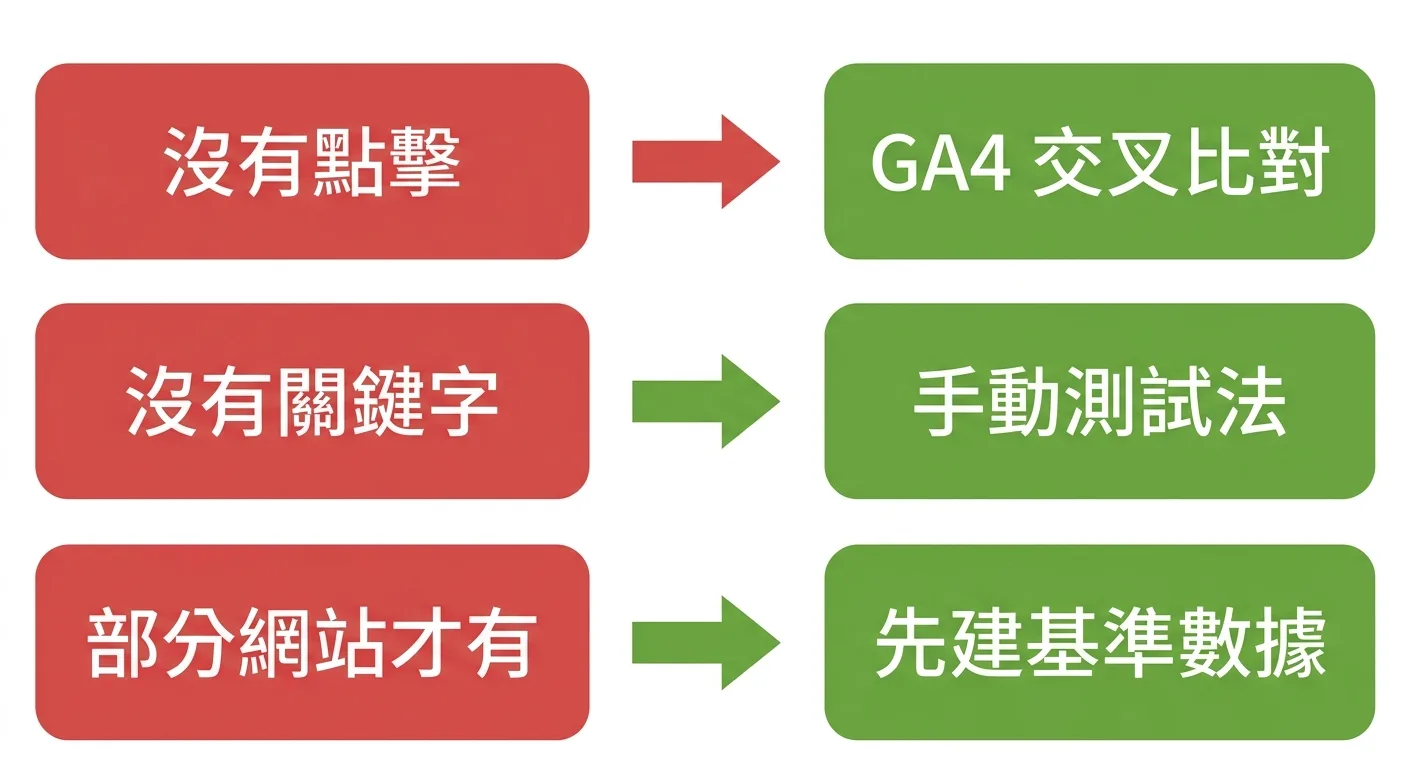
Three limitations, three patches:
- No clicks → patch with GA4's AI platform referral data. GSC shows exposure, GA4 shows visits; together they answer "exposure without traffic" versus "no exposure at all". Full steps in AI search traffic analysis
- No queries → patch with manual testing. Run a fixed question set against AI platforms monthly and log citations — your self-built "query dimension". Method in How to measure GEO performance
- No report until impressions accrue → while impressions build up, build your baselines (the three actions covered earlier)
You Have the Data — Now What Do You Change?
Data is not for staring at; it is for acting on. This is the heart of the article.
From our experience running GEO for our own site and client sites, the most effective approach after getting AI exposure data is a fixed monthly iteration loop, four steps:
Step 1: Pull the Data on a Fixed Monthly Schedule
Same time each month, same dimensions (exposure trend + cited-pages list), saved as a monthly snapshot. A single month's number means nothing; the trend does.
Step 2: Exposure Low or Zero → Audit the Visibility Basics
If AI can't see you, it is usually infrastructure. Check in order:
- Can crawlers get in? Is robots.txt letting Google's AI-related crawling through (details in the AI crawler setup guide — and note that AI crawler activity has risen markedly in recent years, with news media blocking en masse; for small businesses, copying that blockade means going invisible in AI search)
- Does your content chunk well? AI cites paragraphs, not whole articles — each paragraph must stand alone (how-to in Content chunking for AI)
- Is indexing healthy? Back to GSC's page indexing report
Step 3: Exposure but No Business Impact → Check the Cited-Pages List
Pull the pages dimension and ask three questions: are the cited pages related to your core services? Which topics do citations cluster in? Do those topics overlap your customer base?
If AI keeps citing your niche posts while your money pages sit at zero, the money pages need better structure or stronger authority signals — copy the patterns from the cited articles.
Step 4: After Changes, Watch the Dates Dimension
After restructuring or adding data, compare exposure before and after the change date. Amplify what reacts; move to the next hypothesis when nothing does.
The spirit of this loop matches what we wrote in How AI affects SEO: in the AI era, content competition is won by iteration speed, not single-article perfection.
Three Common Misjudgments During Iteration
- Treating weekly noise as a trend: AI feature triggering is inherently random; week-over-week swings are normal. Judge monthly at minimum, and leave at least four weeks between actions
- Rewriting everything on zero exposure: zero exposure should first trigger an infrastructure audit — crawler access, indexing, whether the Search generative AI control is set to exclude. No amount of rewriting fixes a plumbing problem
- Chasing exposure without topic fit: pretty exposure numbers concentrated in off-business topics are idle motion. Once a quarter, map cited topics against revenue services; the gap is where your content budget should go

From SGE to the AI Performance Report: How Google Got Here
Zoom out and this report is not a surprise — it is the inevitable next step in three years of Google AI search evolution.
- 2023: Google launches the SGE (Search Generative Experience) experiment in Search Labs — Search Labs being Google's early-access program for new search features; SGE was the predecessor of AI Overviews
- 2024: SGE graduates and is renamed AI Overviews, appearing at scale atop search results
- 2025–2026: AI Overviews coverage keeps expanding; AI Mode arrives. AI Mode accounted for about 0.34% of searches in US clickstream data from January to April 2026, but Google says its query volume is more than doubling every quarter (Search Engine Journal, 2026)
- June 2026: the Search Generative AI performance report launches — the first official measurement tool for AI visibility
See the line? Features first, measurement follows. Google is raising AI search as a long-term strategy, and the arrival of measurement tooling usually signals one thing: the feature is moving from experiment to infrastructure.
For site owners the signal is clear. AI search optimization is no longer a "whether" question — it is a "how fast can you iterate" question. For a Taiwan-market entry strategy, see GEO strategy for Taiwanese businesses.

FAQ
Where do I find the Generative AI report in Search Console?
You don't enable it manually. It appears as a "Generative AI" category inside the Search and Discover reports for eligible sites (awoo, 2026). Your site must be verified in GSC first; the report has been available to all websites worldwide since August 31, 2026 — if you still don't see it, your site may have too few impressions in AI features or may be excluded via the Search generative AI control.
Why can't I see the AI performance report on my site?
The report has been available to all websites worldwide since August 31, 2026; the common reasons Google lists are too few impressions in AI features or having excluded your site via the Search generative AI control. It first rolled out to a subset of sites in June 2026 (awoo, 2026). Until the report appears, audit your AI crawler permissions and build a manual-testing baseline so you have a before/after comparison once it does.
Does the AI report include clicks and query data?
Not currently. It provides five dimensions — impressions, pages, countries, devices, dates — without clicks, CTR, or the queries that triggered AI features (awoo, 2026). Patch the click side with GA4's AI platform referral data; the two datasets together give the full picture.
How else can I measure GEO performance besides this report?
Combine three methods: GA4 filtering for AI platform referrals (Claude referrals grew nearly 4x in Jan–Apr 2026, the fastest-growing AI traffic source (Search Engine Journal, 2026)), fixed-question monthly manual tests, and brand mention monitoring. The GSC report covers Google; these cover the other AI platforms.
Does this report affect Google rankings?
No. It is a measurement tool, not a ranking factor. But it changes how you optimize: you can finally verify which content structures get cited by AI, and content iterated on that evidence tends to gain visibility in both AI search and traditional search.
Turning GEO from Faith into Data: Your Next Step
To recap: the Search Generative AI performance report gives GEO its first official dataset — five dimensions, open to all websites worldwide since August 31, 2026, exposure only. It is imperfect, but "observable" alone changes the game: you can verify and iterate instead of guessing.
Your action list:
- Open GSC and check whether the "Generative AI" category has appeared
- If not: audit crawler access, build a manual-testing baseline, set up GA4 filters
- If yes: run the monthly loop — pull data → audit basics → check the cited list → review after changes

🎯 Take Action
GEO performance is measurable now — the next step is turning data into action. AI SEO Hacker offers an AI-driven SEO/GEO content system with monthly AI citation test reports.
Free consultation | View service plans
Further Reading
- Google Search Console Tutorial: From Setup to Reading Reports
- How to Measure GEO Performance: AI Search Visibility Metrics
- AI Search Traffic Analysis: Tracking ChatGPT and AI Referrals
- What Is GEO? The Complete Guide to Generative Engine Optimization
- How AI Affects SEO: Content Strategy for the AI Search Era
References
- Introducing Search Generative AI performance reports in Search Console - Google Search Central Blog
- Search Console Generative AI report - awoo
- Google Search Traffic To Open Web Drops To 23% - Search Engine Journal
- Claude Is The Fastest-Growing AI Traffic Source - Search Engine Journal
- Announcing web multimodal Search performance reporting in Search Console - Google Search Central Blog

![How to Measure GEO Performance: AI Search Visibility Metrics Explained [2026]](/_next/image?url=%2Fblog%2Fimages%2Fgeo%2Fgeo-performance-measurement-01.webp&w=3840&q=75)